Does Coding Count as Screen Time? Productive Technology Use for Children
“Does the time my child spends coding count as screen time?” It is a common question for parents whose children are interested in robotics, coding and creative technology. The short answer is yes. If a child is using a computer, tablet or another digital display, it is technically part of their screen use. But the more useful question is not simply: “How many minutes did my child spend looking at a screen?” It is also important to consider what the child was doing, how actively they were involved, what they created and whether that digital activity was replacing other important parts of daily life. Watching a continuous stream of short videos is not the same experience as programming a robot. Likewise, playing Minecraft purely for entertainment and designing a structured project inside Minecraft Education can involve very different goals and levels of engagement. That is why children's technology use should be considered not only in terms of quantity, but also quality, purpose and context.
Is All Screen Time the Same?
No. The term “screen time” includes a wide range of activities. A child may use a screen to: - watch videos - scroll through social media - play a game - read - research a topic - write code - program a robot - develop a game - create a 3D model - design a digital story These experiences can involve very different levels of thinking and participation. Current approaches to children and digital media increasingly consider not only the amount of screen use, but also the quality of the content, the context in which it is used and what other activities it may be replacing.
Passive Screen Use vs Productive Technology Use
Passive screen use usually involves consuming something that has already been created. Examples might include: - watching videos - scrolling through short-form content - following autoplay entertainment With productive technology use, the child has an active role and a goal. For example: - programming a robot - designing game mechanics - creating a character - building a 3D model - debugging code - developing a solution inside Minecraft Education The important distinction is not simply which application is open. It is the child's role. Are they mainly consuming, or are they thinking, designing, testing and creating?
Why Can Coding Be a Different Kind of Screen Experience?
During coding, children are often doing far more than looking at a screen. They set a goal. Give instructions. Observe the result. Investigate problems. Change their solution. Test again. If a robot needs to travel a certain distance, for example, a child might: - adjust motor speed - change duration - modify a turning angle - review sensor values - reorganise the sequence of code The screen becomes a tool for thinking and creating rather than the entire experience.
Does Robotics Mean Constant Screen Use?
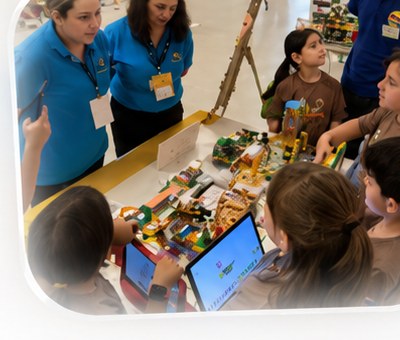
In a well-designed robotics activity, often not. Robotics brings the physical and digital worlds together. A child might: design → build → program → run the robot → observe → modify the physical model → test again. The computer or tablet is only one part of the process. In physical robotics projects, children continually move between the digital interface and the real object they are building. That is a very different experience from passively consuming media.
Is Playing Minecraft the Same as Using Minecraft Education?
Both involve a screen. But the purpose and structure can be very different. Inside a structured Minecraft Education project, children may: - research a problem - design a solution - build a model - divide responsibilities with teammates - explore maths or science concepts - use coding - present their work The important question is not simply whether Minecraft is being used. It is what the child is doing inside the environment. A platform being labelled educational is not enough on its own. Meaningful learning still requires purpose, structure, guidance and active participation.
Playing Games vs Programming Games
Playing a game and understanding how to build one involve different skills. When children develop games, they may: - create rules - define character behaviour - use conditions - debug problems - think about user experience - work with visual design - turn an idea into a functioning product The screen changes from a place where entertainment is consumed into a workspace where something is created. That does not mean the screen time disappears. It means the quality and purpose of the experience are different.
How Does Technology Use Change With Age?
Technology use should develop alongside a child's age, experience and readiness.
Younger Children
For younger children, physical exploration should remain an important part of the experience. Stories, building, mechanisms, movement, cause and effect and short digital interactions can create a more balanced approach. The screen can support the physical activity rather than becoming the activity itself.
Primary School Years
Children can begin working on more structured projects involving block-based coding, robotics, Minecraft Education and digital design. At this stage, digital work can be combined with physical making, discussion, teamwork and problem solving.
Ages 8–14
For older children, technology can become a much more powerful creative tool. They may work on: - advanced robotics - game programming - artificial intelligence - 3D modelling - digital design - Minecraft Education - sensor and data projects Even at this age, productive technology use does not mean unlimited screen time. How the technology is being used remains important.
Can Productive Screen Time Be Unlimited?
No. The fact that a child is coding does not mean that staying on a computer indefinitely is healthy or necessary. Even high-quality digital activities should not consistently replace: - sleep - movement - sport - outdoor activity - face-to-face social interaction - reading - family time - other interests and hobbies A useful question for parents is: “What is this digital activity giving my child, and what might it be replacing?” That can be more informative than looking at duration alone.
What Can Parents Look For?
Parents can consider questions such as: - Is my child mainly consuming or creating? - Is there a clear purpose to the activity? - Does the activity involve problem solving? - Is my child making decisions? - Are they designing something? - Do they investigate mistakes? - Is the digital work connected to a real-world project? - Is technology interfering with sleep, movement or social life? - Can my child transition comfortably to other activities? These questions help parents consider the quality of digital use as well as the quantity.
How Code of Bricks Balances Screens and Hands-On Creation
At Code of Bricks, we do not see technology as something children should simply consume through a screen. We want them to: explore, design, build, code, test and improve. In robotics, code interacts with a physical model. In Minecraft Education, the digital environment becomes a project space. In game programming, children move from playing games to designing how games work. In 3D design, an object created on screen can become a physical product. In artificial intelligence projects, the goal is not simply to use an AI tool, but to understand, question and create with technology. That is why we consider both: “How much time did the child spend on a screen?” and: “What did the child think about, design and create during that time?”
Healthy Digital Balance: Purpose, Quality and Context
Technology is already part of children's lives and will continue to play an important role in how they learn, create and work. The goal therefore does not need to be simply eliminating screens. A more useful goal is helping children develop a thoughtful relationship with technology. A meaningful digital experience is: - purposeful - age-appropriate - active - intellectually engaging - creative - connected with the real world - balanced with other important childhood experiences When this balance is designed carefully, coding, robotics and creative technologies can help turn screens from spaces of consumption into tools for creation.
Is Your Child Consuming Technology or Creating With It?
A child's best starting point in robotics, coding, game development, Minecraft Education, artificial intelligence or creative technology depends on their age, experience and interests. At Code of Bricks, our individual introductory workshop helps us understand your child's interests and current experience and identify an appropriate technology journey.
Frequently Asked Questions
Does coding count as screen time?
Yes. If coding is done on a computer or tablet, it is technically part of screen use. However, it is also useful to consider the quality, purpose and context of that screen activity and whether the child is actively creating or passively consuming.
Does robotics increase screen time?
Robotics may involve a computer or tablet during the coding stage, but physical robotics also involves building, testing, modifying mechanisms and interacting with a real model. The entire activity therefore does not necessarily take place on a screen.
Does Minecraft Education count as screen time?
Yes. Minecraft Education involves screen use. However, it can be used within structured projects involving problem solving, coding, design and teamwork. What the child does within the platform matters.
Can productive screen time be unlimited?
No. Educational or creative technology use should still be balanced with sleep, physical activity, outdoor experiences, face-to-face relationships and other important parts of childhood.
What are examples of productive technology use for children?
Robotics, coding, game programming, 3D design, Minecraft Education, digital design and age-appropriate AI projects can become productive technology experiences when children are actively solving problems, designing and creating.
Is your child consuming technology or creating with it?
In our individual introductory workshop, we explore your child's interests and current experience and identify an appropriate technology journey together.
Request a Free Introductory Workshop